# Welcome

HAHA is a community driven meme coin on Astar zkEVM created to support and raise awareness of the Astar Network.

<figure><img src="https://2894769388-files.gitbook.io/~/files/v0/b/gitbook-x-prod.appspot.com/o/spaces%2F07olPaW7WAG2jjKAYecU%2Fuploads%2FTrKkLvFrxciMS4k6YdTn%2Fmamaround.png?alt=media&amp;token=98d0f70a-5874-43e3-8734-14145fd5afbc" alt="" width="333"><figcaption><p>HAHA Logo</p></figcaption></figure>

For far too long meme coins have been dominated by the dogs, and the frogs. It’s time for us to shine a spotlight on the Mother Of Memes! The HAHAs, the MAMAs, the OGs that produced the OGs of today. In this moment, we raise a token in homage to the most undervalued members of the crypto space, we do it for the HAHAs. Let's make HAHA proud!

## Contract

0xA84DBE4602cBAcfe8Cd858Fe910b88ba0e8b8B18

## Purchase

<https://quickswap.exchange/#/swap/v3?currency0=0xdf41220c7e322bfef933d85d01821ad277f90172&currency1=0xa84dbe4602cbacfe8cd858fe910b88ba0e8b8b18&swapIndex=2>


# Tokenomics

<figure><img src="https://2894769388-files.gitbook.io/~/files/v0/b/gitbook-x-prod.appspot.com/o/spaces%2F07olPaW7WAG2jjKAYecU%2Fuploads%2FiG4nW2K2VUrCGAsxDRlG%2FScreenshot%202024-03-21%20225256.png?alt=media&amp;token=f1aae498-a569-4218-85fd-69a3f9cdae58" alt=""><figcaption><p>HAHA coin tokenomics</p></figcaption></figure>

Initial Liquidity

60% of total token supply provided as initial liquidity on Quickswap. \
\
Liquidity pair $HAHA/$ASTR created on Astar Network's zkEVM.

<https://quickswap.exchange/#/analytics/v3/pair/0x1562c1b2b3e81b293b54072c2f743c1ceb34ce06?isUni=true>

## Degeneration Campaigns

23% of total token supply allocated to Degeneration Campaigns as follows:

* 15% Community Growth
* 5% Token Burn
* 2% Targeted Airdrops
* 1% Pre-Launch Campaigns

Degeneration campaigns (DC) will be used to to attract Ethereum Layer 2 and Polkadot commuinties to Astar zkEVM. The DC allocation will also be used to provide rewards and grants to community members that help develop the HAHA coin project.

Examples of campaigns:

* Branding competitions;
* Meme competitions;
* Astar Network and top L2 ecosystem personality raids;
* Japanese community and Influencer outreach;
* Competition and participation campaigns linked to active project promoting; and
* Community lead Ideation campaigns.

## Project Development

10% of total token supply allocated to developing the HAHA project as follows:

* 5% Degen dApp grants
* 4% Exchange listings
* 1% Team Fund

**Degenerate dApps**

HAHA plans on launching, and supporting community members who build, Degenerate Apps (DApps) focused on burning HAHA tokens.

**Team Funds**

* Distributions will be made to contributing team members for the purpose of supporting the HAHA project and its community;
* Distributions amounts will be made in proportion of the value contributed;
* Team members must make significant and meaningful contributions across the HAHA project during a distribution period to be considered eligible for team fund distributions for that period;
* All team distribution transactions will be published;
* Team distributions will continue for a maximum of 12 months or until team allocation is exhausted; and
* Any team funds remaining after 12 months will be burned.

## dApp Staking Rewards

5% of total token supply allocated to reward pool for Astar Network dApp staking.

An application to join Astar Network’s dApp staking program will be made post launch. If dApp staking application is unsuccessful the full 5% token allocation will be burned.

## Initial Liquidity Providers

2% of total token supply allocated to initial liquidity providers. Individual allocation distributed in proportion to provider's contribution.

<br>


# Deflationary Mechanics

Multiple burn mechanisms will be put in place to ensure token deflation over time:

* Burning team DEX fees
* Community lead burn events to permanently remove tokens from circulation
* Creation of coin burning Degenerate dApps

## DEX Fees

Soon after launch, [Initial Liquidity](/haha-coin/tokenomics#initial-liquidity) provided by the team will be burned, resulting the burn of all team LP rewards.

## Burn Events

Burn events will take place as part of the [Degeneration Campaign](/haha-coin/tokenomics#degeneration-campaigns). Pending community votes, further token burn campaigns may take place through buy back or community lead burning initiatives.

## Degenerate dApp

HAHA has allocated[ a portion of the total token](/haha-coin/tokenomics#project-development) supply to support the community in creating dApps that burn $HAHA. Currently, a Play-To-Burn game is underdevelopment by the team and will be released shortly after launch with a grant program to follow after.

<br>


# Road Map

MAMA keeps evolving and so too does the HAHA community! As such, our plans and goals may shift as we take on new ideas from our ever-growing community. Though we have roadmap phases, the team is constantly working to make MAMA proud and sometimes, might deliver later phase items earlier than expected!

## Phase 1: Let there be HAHA!

**Establish a core team to oversee administrative tasks:**

* Establish HAHA’s purpose, values, and objectives
* Develop tokenomics
* Create official social media channels
* Secure initial liquidity funding
* Deploy liquidity pool on DEX

## Phase 2: Mama loves Astar

**Expand HAHA Coin’s presence by onboarding Astar community to Astar  zkEVM:**

* Collaborate and partner with Astar Network ecosystem projects
* Develop branding – logos and other visual assets
* Acknowledge and reward active community members
* Organize AMAs, contests, and giveaways
* Launch marketing campaigns
* Develop Astar zkEVM onboarding materials

## Phase 3: The Mother of Memes welcomes all good boys and girls

**Expand HAHA Coin’s presence by onboarding Layer 2 community to Astar zkEVM**

* Collaborate and partner with other L2 projects.
* Launch marketing campaigns targeting L2 communities
* Engage community members in marketing ideation
* Develop Astar zkEVM onboarding material

## Phase 4: HAHA to the moon!

**Build sustainable infrastructure and become a leading Astar zkEVM project:**

* Develop and launch Play-to-Burn dApp
* Launch community generated NFT collection
* Launch dApp grant program&#x20;
* Create an NFT launchpad
* Apply for Astar Network dApp staking platform


# Contract

## Contract

0xA84DBE4602cBAcfe8Cd858Fe910b88ba0e8b8B18

### zkEVM Explorer

{% embed url="<https://astar-zkevm.explorer.startale.com/address/0xA84DBE4602cBAcfe8Cd858Fe910b88ba0e8b8B18>" %}


# Connecting to zkEVM

## Setup zkEVM

Instructions below are reproduced from Astar Network docs&#x20;

{% embed url="<https://docs.astar.network/docs/use/zkevm-guides/set-up-zkevm>" %}

### Automatically[​](https://docs.astar.network/docs/use/zkevm-guides/set-up-zkevm#automatically)

To automatically add **Astar zkEVM** networks to your wallet, you can use one of the following options:

* [**Astar Portal**](https://portal.astar.network/astar-zkevm) - When you switch to Astar zkEVM, the portal will prompt you to change and add the network to your EVM wallet;
* [**ChainList**](https://chainlist.org/) - You can find Astar zkEVM on ChainList *(ID: `3776`)* and add it to your EVM wallet;
* [**Astar zkEVM Block Explorer**](https://astar-zkevm.explorer.startale.com/) - At the bottom of the Block Explorer page, you can find an option to add Astar zkEVM to your wallet;

### Manually[​](https://docs.astar.network/docs/use/zkevm-guides/set-up-zkevm#manually) <a href="#manually" id="manually"></a>

To add **Astar zkEVM** network to MetaMask or any other EVM wallet, enter the following data :

* Astar zkEVM

| Name                    | RPC URL                                  | ChainID | Block Explorer URL                           | Currency |
| ----------------------- | ---------------------------------------- | ------- | -------------------------------------------- | -------- |
| **Astar zkEVM Network** | `https://rpc.startale.com/astar-zkevm`   | `3776`  | <https://astar-zkevm.explorer.startale.com/> | **ETH**  |
| **Astar zkEVM Network** | `https://rpc.astar-zkevm.gelato.digital` | `3776`  |                                              | **ETH**  |
| **Astar zkEVM Network** | `https://astar-zkevm-rpc.dwellir.com`    | `3776`  |                                              | **ETH**  |


# Display Tokens

## Import using Quickswap

Go to <https://quickswap.exchange/#/swap?swapIndex=2>  and choose the blue "Select a token" button.

<figure><img src="https://2894769388-files.gitbook.io/~/files/v0/b/gitbook-x-prod.appspot.com/o/spaces%2F07olPaW7WAG2jjKAYecU%2Fuploads%2FtiRUZ8BaeQXPa3VVxqk8%2FScreenshot%202024-03-19%20200939.png?alt=media&amp;token=12a4a966-9350-4684-9137-f353bddb3406" alt="" width="463"><figcaption><p>Quickswap select a token</p></figcaption></figure>

Find the token you wish to import to your wallet and click the plus sign next to the token name.

<figure><img src="https://2894769388-files.gitbook.io/~/files/v0/b/gitbook-x-prod.appspot.com/o/spaces%2F07olPaW7WAG2jjKAYecU%2Fuploads%2Fqc3LSm1JXrzuoyKoRyc9%2FScreenshot%202024-03-19%20202232.png?alt=media&amp;token=43117f68-3045-48be-9af1-63754db30f21" alt="" width="479"><figcaption><p>Quickswap add token</p></figcaption></figure>

Click the "Add Token" button in your wallet pop-up to finalize the process.

## Import Token Manually

Metamask will be used for this example. The process will be similar in EVM wallets that support Astar zkEVM.

In your wallet click on the 'Import tokens' option.

<figure><img src="https://2894769388-files.gitbook.io/~/files/v0/b/gitbook-x-prod.appspot.com/o/spaces%2F07olPaW7WAG2jjKAYecU%2Fuploads%2FUXvtlzC46slkflhW3xCf%2FScreenshot%202024-04-05%20131357.png?alt=media&amp;token=250734ad-4ece-46af-9294-a570a168e531" alt=""><figcaption><p>Metamask 'Import tokens' option</p></figcaption></figure>

Create the custom token.

1. Enter the token contract address:

*<mark style="color:red;">ALWAYS DOUBLE CHECK THE FOLLOWING ADDRESSES. DO NOT ENTER WITHOUT CONFIRMING.</mark>*

$HAHA's contract address:

0xA84DBE4602cBAcfe8Cd858Fe910b88ba0e8b8B18

$ASTR's Astar zkEVM contract address:&#x20;

0xdf41220C7e322bFEF933D85D01821ad277f90172

2. Enter the Token symbol.

   HAHA or ASTR&#x20;
3. Make sure that the Token decimal is set to 18.
4. Click the 'Next' button.

<figure><img src="https://2894769388-files.gitbook.io/~/files/v0/b/gitbook-x-prod.appspot.com/o/spaces%2F07olPaW7WAG2jjKAYecU%2Fuploads%2FSNpwa3Zgf96iJnb07rif%2FScreenshot%202024-04-05%20131141.png?alt=media&amp;token=6d4630ce-72dd-4aa5-8fef-0973c5faae2a" alt=""><figcaption><p>Metamask custom token import</p></figcaption></figure>

4. On the next screen click the 'Import' button.&#x20;

&#x20;The token will now be visible in your wallet.

<figure><img src="https://2894769388-files.gitbook.io/~/files/v0/b/gitbook-x-prod.appspot.com/o/spaces%2F07olPaW7WAG2jjKAYecU%2Fuploads%2FjQoqzEG8S1PnW5Fv8iyF%2FScreenshot%202024-04-05%20132435.png?alt=media&amp;token=f6a794ec-2b25-4ed8-9a93-1edd507efb03" alt=""><figcaption><p>Metamask custom token import screen</p></figcaption></figure>


# Bridge to zkEVM

Please note that $HAHA is an Astar zkEVM token. zkEVM is an Ethereum Layer 2 solution requiring ETH for gas and fees.

## Bridge ETH & ASTR to zkEVM

### 1. Purchase on Exchange

If you do not already have $ETH on zkEVM you will need to purchase both $ETH and $ASTR from a centralised exchange. If you already have $ETH on zkEVM, it is more cost effective to buy $ASTR and swap it to $ETH once on zkEVM.&#x20;

The rest of this guide will assume you do not have $ETH already on zkEVM.

### 2. Remove Tokens from Exchange

Send $ETH directly to an EVM wallet (ex: Metamask). $ASTR will need to be sent to a substrate wallet (ex: polkadot.js, Nova, Talisman, SubWallet, etc...).&#x20;

Note: CEX trade substrate $ASTR, not EVM $ASTR. If you are purchasing from a DEX, be sure to confirm which $ASTR you are trading (subtrate or EVM).

### 3. Send ASTR to EVM Wallet

Go to the Astar Portal -  <https://portal.astar.network/> and select Astar (L1), then click the blue "Select Wallet" button.

<figure><img src="https://2894769388-files.gitbook.io/~/files/v0/b/gitbook-x-prod.appspot.com/o/spaces%2F07olPaW7WAG2jjKAYecU%2Fuploads%2FtxvTb5ntaeR8vIuI0H6r%2FScreenshot%202024-03-19%20202801.png?alt=media&amp;token=9d3c1acc-56c2-4687-910b-0c34da998134" alt="" width="323"><figcaption><p>Connect to Astar L1</p></figcaption></figure>

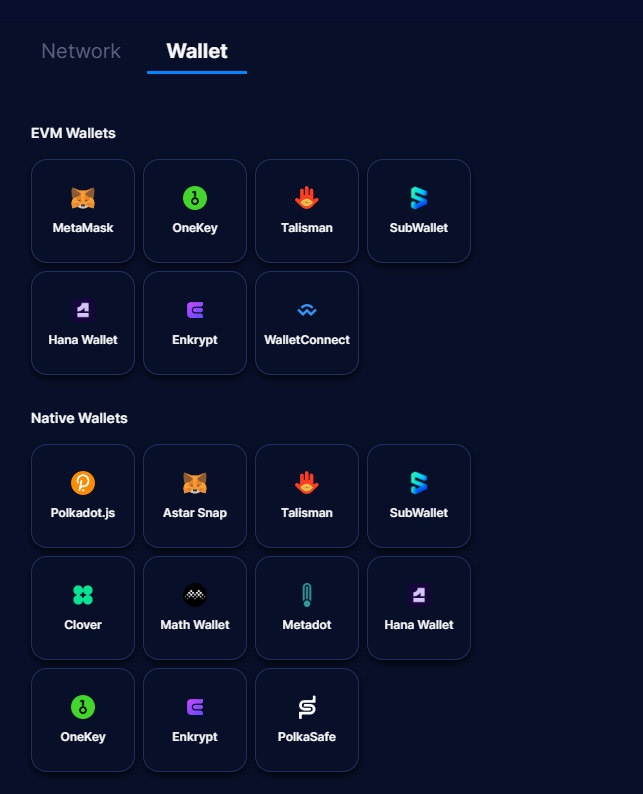
Choose your wallet from the list of wallets under the "Native Wallets" heading.

<figure><img src="https://2894769388-files.gitbook.io/~/files/v0/b/gitbook-x-prod.appspot.com/o/spaces%2F07olPaW7WAG2jjKAYecU%2Fuploads%2FD37HRbV0UFed4s4T7oz4%2FScreenshot%202024-03-19%20203020.png?alt=media&amp;token=a4dfe6d8-2f09-40a6-9f10-96ecdeafd97f" alt="" width="322"><figcaption><p>Choose native (substrate) wallet</p></figcaption></figure>

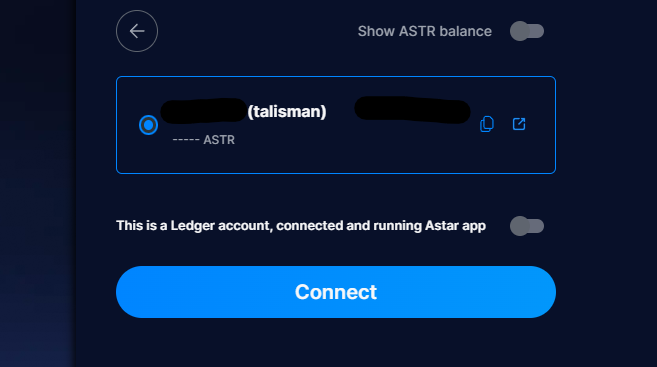
Select the wallet you sent $ASTR to in step 2 and click the blue "Connect" button.

<figure><img src="https://2894769388-files.gitbook.io/~/files/v0/b/gitbook-x-prod.appspot.com/o/spaces%2F07olPaW7WAG2jjKAYecU%2Fuploads%2FkSZNDkwQNtNT23IO3SvY%2FScreenshot%202024-03-19%20203309.png?alt=media&amp;token=0c5e8fef-5d9f-4939-89a0-73e1d5fdfcf4" alt=""><figcaption><p>Connect wallet</p></figcaption></figure>

In the $ASTR token's Transferable section, click on the blue arrow.

<figure><img src="https://2894769388-files.gitbook.io/~/files/v0/b/gitbook-x-prod.appspot.com/o/spaces%2F07olPaW7WAG2jjKAYecU%2Fuploads%2FPyvxeN1YdiMATsxuCNT1%2FScreenshot%202024-03-19%20203752.png?alt=media&amp;token=a9379e67-f05f-445e-a728-54ac0c28a707" alt=""><figcaption><p>Choose ASTR</p></figcaption></figure>

Your connected substrate wallet will auto-populate in the "From" field. Enter your EVM wallet address is the "To" field.

*<mark style="color:red;">**Note: Make sure this is the same wallet address that holds your $ETH.**</mark>*

ASTR will be auto-populated in the token dropdown, to the right, enter the amount of $ASTR you wish to transfer from your substrate wallet to your EVM wallet.

Note: Do not transfer the entire balance. You will need to leave a minimum of 0.000000000001 ASTR in your substrate wallet to fulfil the Astar Network's Existential Deposit.

Choose an appropriate transaction speed, check the warning box, and click the blue "Confirm" button.

<figure><img src="https://2894769388-files.gitbook.io/~/files/v0/b/gitbook-x-prod.appspot.com/o/spaces%2F07olPaW7WAG2jjKAYecU%2Fuploads%2FUZZTf8tbT15GrkhhVuiz%2FScreenshot%202024-03-19%20210322.png?alt=media&amp;token=a69cd3e6-3b23-4e8c-99e5-77557abff00e" alt=""><figcaption><p>Transfer substrate ASTR to EVM ASTR</p></figcaption></figure>

Agree and confirm transaction in wallet to finalize the transfer.

### 4. Bridge ETH to zkEVM

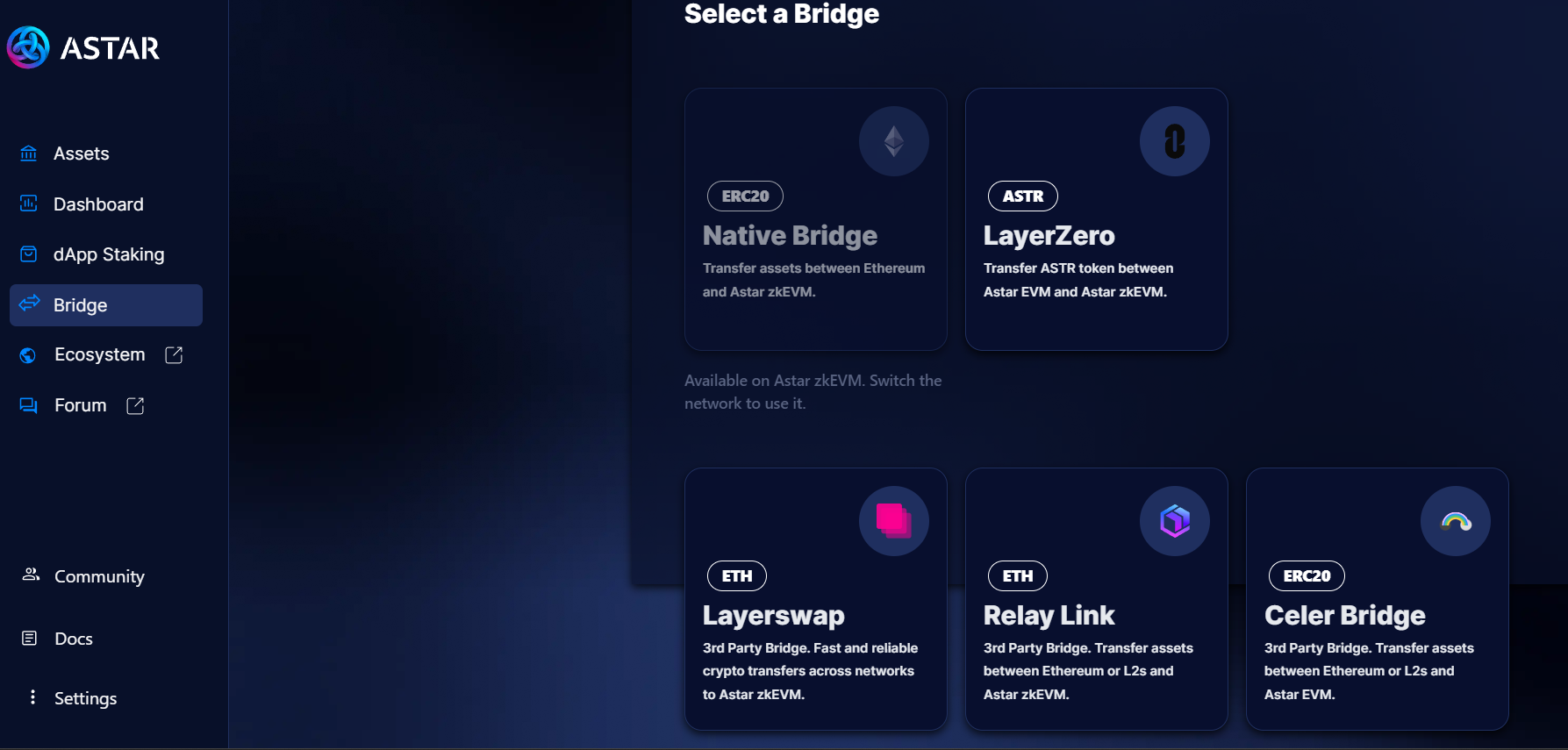
A list of bridges is available at <https://portal.astar.network/>. As of this writing, Relay is the least expensive and will be use in this example.

Select "Bridge" from the left-hand menu, then click on the "Relay Link" bridge.&#x20;

Alternatively, go directly to the Relay bridge site - <https://relay.link/bridge/astar-zkevm/?fromChainId=1>

Note that Relay is a third party app and not related to Astar Network.

<figure><img src="https://2894769388-files.gitbook.io/~/files/v0/b/gitbook-x-prod.appspot.com/o/spaces%2F07olPaW7WAG2jjKAYecU%2Fuploads%2FKfDDNyV9v34MA0RKStWn%2Fimage.png?alt=media&amp;token=8adddc33-31aa-40c6-8a6d-8a2957522322" alt=""><figcaption><p>Bridges to Astar zkEVM</p></figcaption></figure>

Connect your wallet, double check From Ethereum To Astar zkEVM, enter the amount of $ETH you would like to bridge and click the purple "Connect" button.

<figure><img src="https://2894769388-files.gitbook.io/~/files/v0/b/gitbook-x-prod.appspot.com/o/spaces%2F07olPaW7WAG2jjKAYecU%2Fuploads%2FyUfkz4wqz3AKw9p1Jkt8%2FScreenshot%202024-03-19%20215800.png?alt=media&amp;token=532274da-923a-4d6a-983f-d61310ff49f4" alt=""><figcaption><p>Bridge ETH to Astar zkEVM on Relay</p></figcaption></figure>

Agree and confirm transaction in wallet to finalize the bridge transfer.

### 5. Bridge ASTR to zkEVM

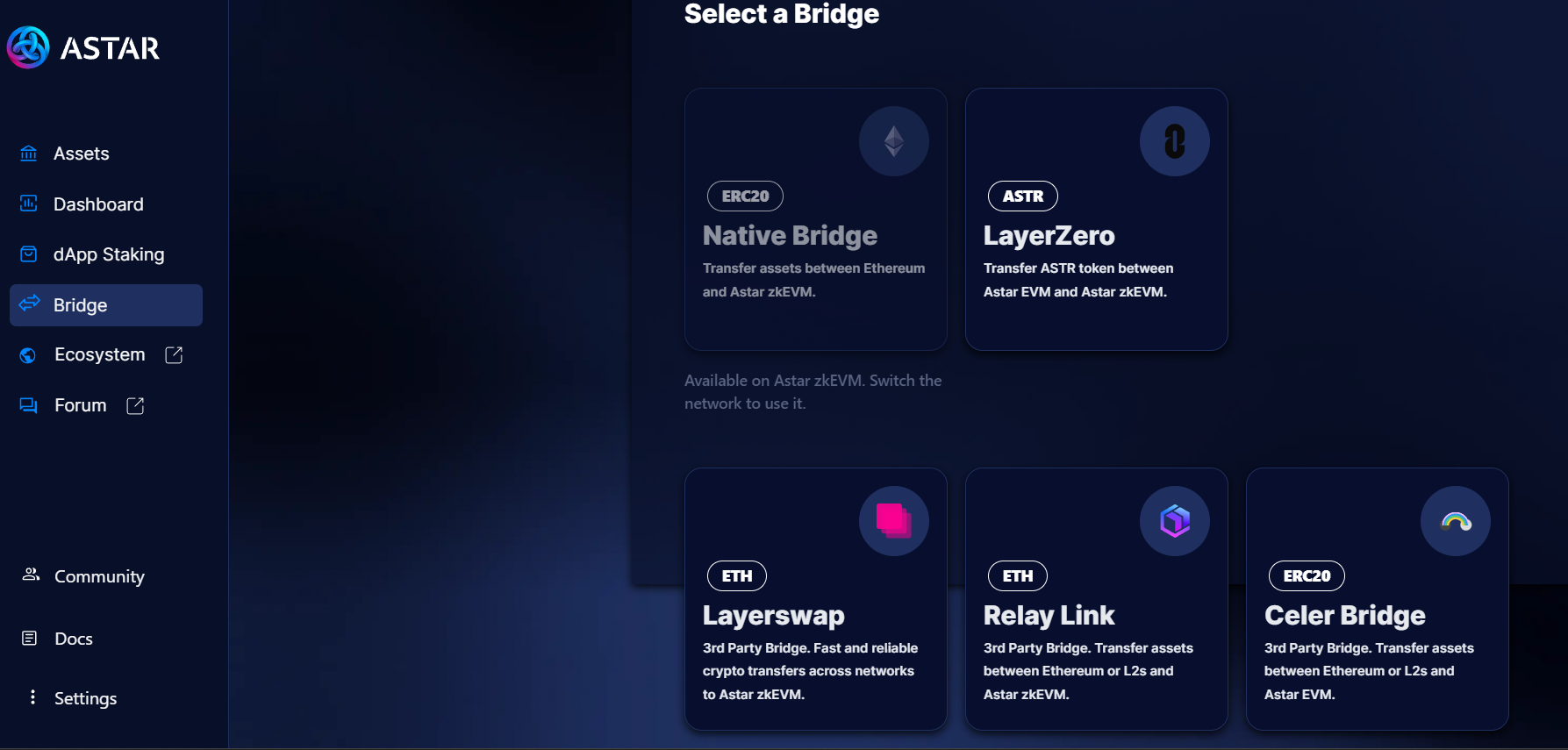
A list of bridges is available at <https://portal.astar.network/>.&#x20;

Select "Bridge" from the left-hand menu, then click on the "LayerZero" bridge. \
\
Alternatively, go directly to the Stargate bridge site - <https://stargate.finance/transfer>.

<figure><img src="https://2894769388-files.gitbook.io/~/files/v0/b/gitbook-x-prod.appspot.com/o/spaces%2F07olPaW7WAG2jjKAYecU%2Fuploads%2FN1zaGK6I5l2XbQ9xqdQw%2FScreenshot%202024-03-19%20212806.png?alt=media&amp;token=a88f67fc-e30a-4399-b723-cba7b5cbe5ff" alt=""><figcaption><p>Bridges to Astar zkEVM</p></figcaption></figure>

Double check that that ASTR token and Network populate the "From" fields and ASTR and Astar zkEVM populate for the "To" fields.&#x20;

Enter the amount of EVM $ASTR to be bridged to zkEVM $ASTR and click the "Transfer" button.

Note: Fees as of this writing are roughly 5 or 6 ASTR. Please leave at least 10 EVM $ASTR unbridged to pay bridge fees.

<figure><img src="https://2894769388-files.gitbook.io/~/files/v0/b/gitbook-x-prod.appspot.com/o/spaces%2F07olPaW7WAG2jjKAYecU%2Fuploads%2Fw7YVuAuspTpVN6wKaVSN%2FScreenshot%202024-03-19%20223540.png?alt=media&amp;token=7aa03bf5-c49b-4105-abc3-dd7b3ac19fe0" alt=""><figcaption><p>Astar zkEVM bridge</p></figcaption></figure>

Agree and confirm transaction in wallet to finalize the bridge transfer.


# Buy on QuickSwap

$HAHA can be purchase on Quickswap:

<https://quickswap.exchange/#/swap?currency0=0xdf41220C7e322bFEF933D85D01821ad277f90172&currency1=0xA84DBE4602cBAcfe8Cd858Fe910b88ba0e8b8B18&swapIndex=2>

The $HAHA liquidity pair is $HAHA / $ASTR. Please refer to [Bridge to zkEVM](/how-to-buy/bridge-to-zkevm) for instructions to bridge Astar to zkEVM.

Note: While liquidity is provided in $ASTR, $HAHA can be purchased with any token that has been bridged to zkEVM.

## How to Swap

1. Connect your wallet and choose "AstarzkEVM" from the "Select Network" dropdown.

<figure><img src="https://2894769388-files.gitbook.io/~/files/v0/b/gitbook-x-prod.appspot.com/o/spaces%2F07olPaW7WAG2jjKAYecU%2Fuploads%2FEAixIHntcBboI2yWjHoQ%2FScreenshot%202024-03-20%20095703.png?alt=media&amp;token=83376c72-afc7-4014-9eb8-3aaac64c45d9" alt=""><figcaption><p>Quickswap wallet and network connect</p></figcaption></figure>

2. Choose a token to swap from by clicking the top token name and selecting from a dropdown. Choose HAHA for the bottom token.

Note:&#x20;

1. Quickswap will require a signature to access the "From" tokens in your wallet prior to swapping.
2. HAHA LP is provided on Market (V3).
3. Following the link at the top of this page will automatically assign ASTR as the from token and HAHA as the to token.

<figure><img src="https://2894769388-files.gitbook.io/~/files/v0/b/gitbook-x-prod.appspot.com/o/spaces%2F07olPaW7WAG2jjKAYecU%2Fuploads%2FZPEcPiKOfrbQXFBiApYp%2Fimage.png?alt=media&amp;token=b0886b5e-ce0f-4220-8bb0-72ab6d57b7c5" alt=""><figcaption><p>Choose swap pairs</p></figcaption></figure>

3. Enter an amount to spend in the 0.00 field next to $ASTR or an amount to purchase in the 0.00 field next to HAHA and click "Swap".

<figure><img src="https://2894769388-files.gitbook.io/~/files/v0/b/gitbook-x-prod.appspot.com/o/spaces%2F07olPaW7WAG2jjKAYecU%2Fuploads%2Fhz4aaPEIosPO6ndRagnr%2FScreenshot%202024-03-19%20151908.png?alt=media&amp;token=c05ded68-3b61-46a0-852a-3aa9e865d3c2" alt=""><figcaption><p>Swap ASTR to HAHA</p></figcaption></figure>

4. Agree and confirm transaction in wallet to finalize the swap.

## Trouble Shooting Swap Issues

Insufficient Liquidity warning is the most common issue. This is due to a UI error. Steps to try when receiving this error:

1. Increase slippage from 0.5% to 3%
2. Adjust purchase amount slowly

   1 -> 10 -> 100 -> etc..
3. Refresh page


# Buy on VeryLongSwap

$HAHA can be purchase on Very Long Swap DeX:

<https://verylongswap.xyz/swap?inputCurrency=0xdf41220C7e322bFEF933D85D01821ad277f90172&outputCurrency=0xA84DBE4602cBAcfe8Cd858Fe910b88ba0e8b8B18>

The $HAHA liquidity pair is $HAHA / $ASTR. Please refer to [Bridge to zkEVM](https://docs.hahacoinastar.com/how-to-buy/bridge-to-zkevm) for instructions to bridge Astar to zkEVM.

## How to Swap

1. Connect your wallet

<figure><img src="https://2894769388-files.gitbook.io/~/files/v0/b/gitbook-x-prod.appspot.com/o/spaces%2F07olPaW7WAG2jjKAYecU%2Fuploads%2Fw482prGB5sMbfVguE5fD%2FScreenshot%202024-04-24%20205213.png?alt=media&amp;token=e1a2e67c-f128-4697-8264-afc19bcbb127" alt=""><figcaption><p>Very Long Swap wallet connect</p></figcaption></figure>

2. &#x20;Click the top token name and select ASTR from a dropdown. Click the bottom token name and choose HAHA from the dropdown.

<figure><img src="https://2894769388-files.gitbook.io/~/files/v0/b/gitbook-x-prod.appspot.com/o/spaces%2F07olPaW7WAG2jjKAYecU%2Fuploads%2FTRnvdbzZyqti0WKnfl10%2FScreenshot%202024-04-24%20205711.png?alt=media&amp;token=ac985974-0c0e-4aa9-b71a-6c426d47b9d4" alt=""><figcaption><p>Very Long Swap swap token select</p></figcaption></figure>

3. Enter an amount to spend in the 0.0 field next to ASTR or an amount to purchase in the 0.0 field next to HAHA and click "Swap".

<figure><img src="https://2894769388-files.gitbook.io/~/files/v0/b/gitbook-x-prod.appspot.com/o/spaces%2F07olPaW7WAG2jjKAYecU%2Fuploads%2FOdqbT8IIE9bCmfcj6xyU%2FScreenshot%202024-04-24%20210119.png?alt=media&amp;token=284371b4-7e6c-41cb-b690-b75bedd7c344" alt=""><figcaption><p>Very Long Swap token swap</p></figcaption></figure>

4. Agree and confirm transaction in wallet to finalize the swap.


# How to Stake During Voting Period

At the beginning of each new staking period there is an 11-day voting period.

For those that know how to stake during the voting period on the Astar Portal, you can stake with HAHA coin here:

\
<https://portal.astar.network/astar/dapp-staking/vote?dappAddress=0xc3a0dd8465dd41c8ffcf03906b80b5b7d148ea1c>

## How to Stake

1. Visit the Astar Portal:\
   <https://portal.astar.network/>
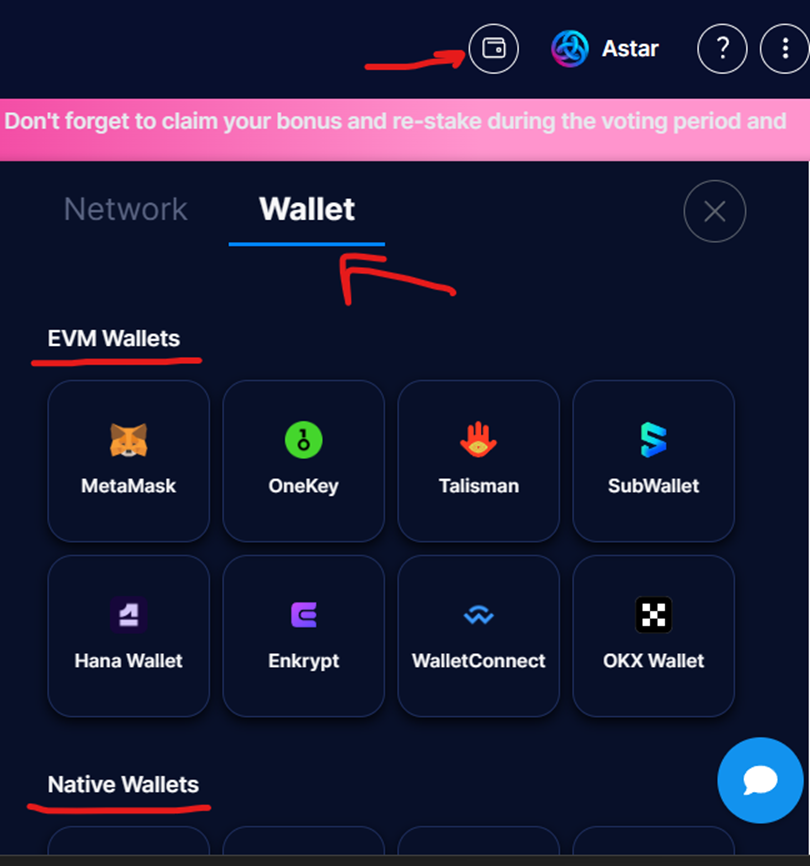
2. Connect your EVM or Native Wallet

<figure><img src="https://2894769388-files.gitbook.io/~/files/v0/b/gitbook-x-prod.appspot.com/o/spaces%2F07olPaW7WAG2jjKAYecU%2Fuploads%2FWB8AmS2Qv5nGJy4R0Q8i%2Fimage.png?alt=media&amp;token=13c3cb63-51c9-4c7d-9736-f52d6578a121" alt="" width="375"><figcaption><p>Connect wallet to Astar Portal</p></figcaption></figure>

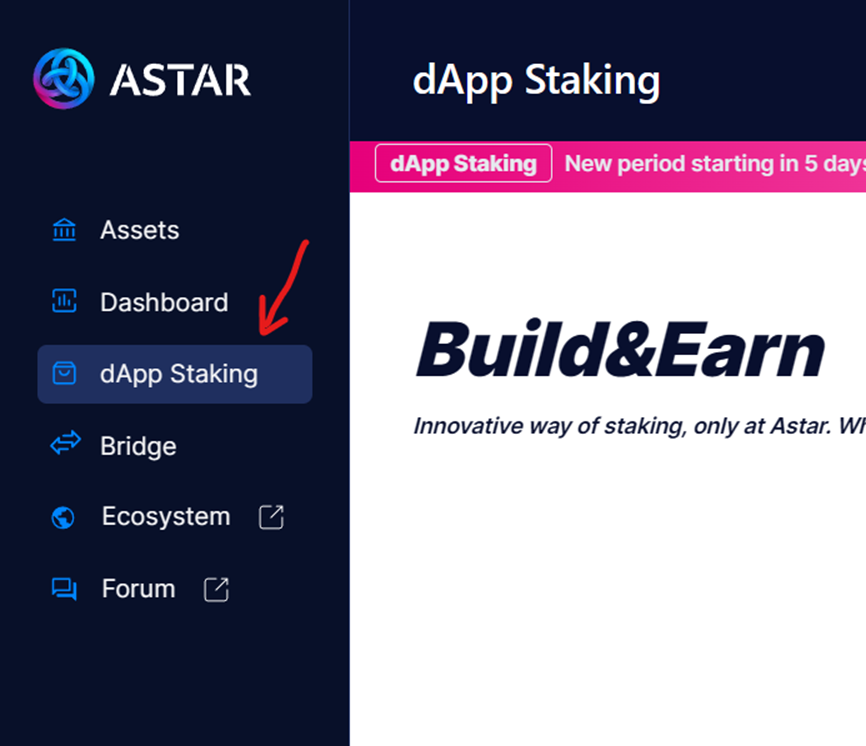
3. Navigate to the dApp Staking page

<div align="center"><figure><img src="https://2894769388-files.gitbook.io/~/files/v0/b/gitbook-x-prod.appspot.com/o/spaces%2F07olPaW7WAG2jjKAYecU%2Fuploads%2FJbmxGg8rVgPw79nWMm6W%2Fimage.png?alt=media&amp;token=3513e568-a9df-4745-9775-b63e6496ce4f" alt="" width="375"><figcaption><p>Astar dApp Staking page</p></figcaption></figure></div>

4. Two methods to stake:
   1\.

   ```
   * &#x20;Scroll down to the "Other" category and click on the HAHA Coin card.

   <figure><img src="/files/4OCmkpUsnbGXXojJqMM4" alt=""><figcaption><p>HAHA Coin dApp Staking card</p></figcaption></figure>

   * Click the blue ‘Vote & Stake’ button.

   <figure><img src="/files/jBixRoGVenM5OHtxde28" alt=""><figcaption><p>Voting and Staking with HAHA Coin</p></figcaption></figure>

   * Skip to step 5.
   ```

   2\.

   ```
   * From the top of the dApp staking page, click the blue "Choose dApp" button.

   <figure><img src="/files/mA5znJ2GpTQsFP4nDbSI" alt=""><figcaption><p>Choose dApp Staking</p></figcaption></figure>

   * Scroll down and click on the "Others" category.

   <figure><img src="/files/akErfxz8EIL2jyoshfa2" alt=""><figcaption><p>Others Category</p></figcaption></figure>

   * Click on the ‘HAHA Coin’ card or search “HAHA Coin”, then click “Done”.

   <figure><img src="/files/GuUGAUMlJlP564b1cu7C" alt=""><figcaption><p>Choose HAHA Coin dApp</p></figcaption></figure>
   ```
5. Enter at least 500 ASTR in the staking field and click the "Next" button.\
   \
   Note:&#x20;
   * Minimum staking amount is 500 ASTR.
   * Account must <mark style="color:red;">**hold more than 10 ASTR**</mark> transferable tokens after you stake.

<figure><img src="https://2894769388-files.gitbook.io/~/files/v0/b/gitbook-x-prod.appspot.com/o/spaces%2F07olPaW7WAG2jjKAYecU%2Fuploads%2FrXGmnVOQiybneR37pXG9%2Fimage.png?alt=media&amp;token=3b51e379-3720-4957-a534-68af89854151" alt=""><figcaption><p>Stake at least 500 ASTR</p></figcaption></figure>

6. Confirm the amount and Approve in wallet to finalize staking during the voting period with HAHA.

<figure><img src="https://2894769388-files.gitbook.io/~/files/v0/b/gitbook-x-prod.appspot.com/o/spaces%2F07olPaW7WAG2jjKAYecU%2Fuploads%2FdE9VEXTJVdRkRMKSbi3K%2Fimage.png?alt=media&amp;token=91fd9acd-984c-437b-8ab4-c87e84d03be3" alt=""><figcaption><p>Confirm Staking</p></figcaption></figure>


# How to dApp Stake

For those that know how to stake on the Astar Portal, you can stake with HAHA coin here:

\
<https://portal.astar.network/astar/dapp-staking/vote?dappAddress=0xc3a0dd8465dd41c8ffcf03906b80b5b7d148ea1c>

## How to Stake

1. Visit the Astar Portal:\
   <https://portal.astar.network/>
2. Connect your EVM or Native Wallet

<figure><img src="https://2894769388-files.gitbook.io/~/files/v0/b/gitbook-x-prod.appspot.com/o/spaces%2F07olPaW7WAG2jjKAYecU%2Fuploads%2FWB8AmS2Qv5nGJy4R0Q8i%2Fimage.png?alt=media&amp;token=13c3cb63-51c9-4c7d-9736-f52d6578a121" alt="" width="375"><figcaption><p>Connect wallet to Astar Portal</p></figcaption></figure>

3. Navigate to the dApp Staking page

<div align="center"><figure><img src="https://2894769388-files.gitbook.io/~/files/v0/b/gitbook-x-prod.appspot.com/o/spaces%2F07olPaW7WAG2jjKAYecU%2Fuploads%2FJbmxGg8rVgPw79nWMm6W%2Fimage.png?alt=media&amp;token=3513e568-a9df-4745-9775-b63e6496ce4f" alt="" width="375"><figcaption><p>Astar dApp Staking page</p></figcaption></figure></div>

4. Two methods to stake:
   1\.

   ```
   * &#x20;Scroll down to the "Other" category and click on the HAHA Coin card.

   <figure><img src="/files/006FxG96evgbDzTNzkog" alt=""><figcaption><p>HAHA Coin dApp Staking card</p></figcaption></figure>

   * Click the blue ‘Vote & Stake’ button.

   <figure><img src="/files/jBixRoGVenM5OHtxde28" alt=""><figcaption><p>Voting and Staking with HAHA Coin</p></figcaption></figure>

   * Skip to step 5.
   ```

   2\.

   ```
   * From the top of the dApp staking page, click the blue "Start Staking Now" button.

   <figure><img src="/files/jqoUJIfpLFCAsjNTelC2" alt=""><figcaption><p>Start Staking Now</p></figcaption></figure>

   * Click the "Vote for project" dropdown arrow.

   <figure><img src="/files/56nSCjiqbcYsub2svTSH" alt="" width="375"><figcaption><p>Stake/Vote for a project</p></figcaption></figure>

   * Type “HAHA Coin” in the search box, click on the HAHA Coin image, and click “Done”.

   <figure><img src="/files/YbTMvJXprYzt7ZJSyLzh" alt="" width="375"><figcaption><p>Select HAHA to stake with</p></figcaption></figure>
   ```
5. Enter at least 500 ASTR in the staking field and click the confirm button.\
   \
   Note:&#x20;
   * Minimum staking amount is 500 ASTR.
   * Account must <mark style="color:red;">**hold more than 10 ASTR**</mark> transferable tokens after you stake.

<figure><img src="https://2894769388-files.gitbook.io/~/files/v0/b/gitbook-x-prod.appspot.com/o/spaces%2F07olPaW7WAG2jjKAYecU%2Fuploads%2FSHQWKw5r57qXitasQ64G%2Fimage.png?alt=media&amp;token=66e4bdd9-4035-4f2b-a429-fdfa14a0c88c" alt="" width="339"><figcaption><p>Stake at least 500 ASTR</p></figcaption></figure>

6. Confirm in wallet to finalize staking with HAHA.


# Socials

## Telegram

<https://t.me/HAHACoinASTAR>

## Twitter

<https://twitter.com/hahacoinastar>

## Website

<https://hahacoinastar.com/>

## Medium

<https://medium.com/@hahazkevm>


# HAHA Hub

Your ultimate destination for the Astar Network ecosystem!

We have joined forces with AirLyft to establish a collaborative space for Astar ecosystem projects looking to showcase their most MAMA-approved offerings to our community.

{% embed url="<https://airlyft.one/hahacoinastar>" %}
Airlyft HAHA Hub Link
{% endembed %}


# Astar MAMA Jetpack Adventure

Astar MAMA Jetpack Adventure is a play-to-burn game built for and by the HAHA community.

<figure><img src="https://2894769388-files.gitbook.io/~/files/v0/b/gitbook-x-prod.appspot.com/o/spaces%2F07olPaW7WAG2jjKAYecU%2Fuploads%2FTCqW1m4g7dMqYA8CpjS4%2FScreenshot%202024-05-16%20183118.png?alt=media&amp;token=e1e37b0c-7c54-426f-872b-27d260559245" alt="" width="375"><figcaption><p>Astar MAMA Jetpack Adventure</p></figcaption></figure>

## MAMA with a Jetpack!

Join Astar MAMA on an unexpected joyride as she seeks out the secret of HAHA Coin! How far you can guide Astar MAMA through treacherous obstacles on your way to a MAMA Approved High Score?

{% embed url="<https://erosgameengine.com/game/astar-mama-jetpack-adventure/>" %}

### Gameplay

Users control a Astar MAMA by tapping their finger (mobile) or pushing the left mouse key (PC/Mac) to help Astar MAMA avoid obstacles and collect HAHA coins.

Each play through has a specific achievements that must be met before progressing. Example: Collect 20 coins, survive for 15 seconds in the air, pass through 5 hoops, etc..&#x20;

<figure><img src="https://2894769388-files.gitbook.io/~/files/v0/b/gitbook-x-prod.appspot.com/o/spaces%2F07olPaW7WAG2jjKAYecU%2Fuploads%2FmmLUMotON54wXRTFYxMh%2FScreenshot%202024-05-16%20192756.png?alt=media&amp;token=9b30b4a0-b6fd-44bc-9f32-61be295d696d" alt="" width="332"><figcaption><p>Current achievement targets</p></figcaption></figure>

A players' score is determined by the number of HAHA coins Astar MAMA collects in a single play through. Player scores are reset for each playthrough.

<figure><img src="https://2894769388-files.gitbook.io/~/files/v0/b/gitbook-x-prod.appspot.com/o/spaces%2F07olPaW7WAG2jjKAYecU%2Fuploads%2F2zcciMLkNvY5nHBc2jF5%2FScreenshot%202024-05-16%20193246.png?alt=media&amp;token=e876d440-71dd-4a3c-9ce0-1d86c7e77b02" alt="" width="298"><figcaption><p>Game score</p></figcaption></figure>

Players can record their score on the leader board by connecting their wallets and saving their game session on-chain. The player's highest score is saved, overwriting any previously lower score.

<figure><img src="https://2894769388-files.gitbook.io/~/files/v0/b/gitbook-x-prod.appspot.com/o/spaces%2F07olPaW7WAG2jjKAYecU%2Fuploads%2FLwmEUZ7hLP32AUo0iKH7%2FScreenshot%202024-05-16%20193552.png?alt=media&amp;token=c62dde47-83dd-459a-855e-f02c5e6c5d86" alt="" width="308"><figcaption><p>Game submission screen</p></figcaption></figure>

### Burn Mechanism

**Max total burn :** 150 Billion

**Initial game launch:** Burn 50 Billion $HAHA coin once the there are 100 wallets on the leader board.

**Gameplay**: For every second the game is played by leader board players, one million $HAHA will be burned, capped at 100 Billion $HAHA.

Example:  200 leader board players combine for 10 minutes (600 seconds) of game play; then the total $HAHA burn will =  100 players \* 600 seconds \* 1,000,000 $HAHA = 60 billion $HAHA burned.&#x20;

Note that burns will be done manually with announcements made pre and post burn on our socials.&#x20;